cyb3r Bhepal.Corporation Menyarankan Anda Agar Menggunakan Mozilla Firefox Dan Aktifkan Selalu JAVASCRIPT Agar Seluruh Tampilan Maksimal :)
Warung Internet
Tampilkan postingan dengan label Software. Tampilkan semua postingan

Kamis, 23 Februari 2012

Comments ResEdit is 1.5.9

ResEdit adalah editor sumber yang berguna untuk program Win32. Anda dapat menggunakannya jika Anda ingin menggunakan dialog, ikon, informasi versi atau jenis sumber daya. File output dapat dikompilasi oleh kompilator Win32, seperti MinGW dan Microsoft Visual C + +.

ResEdit selalu menghasilkan 2 file:

Satu dengan ekstensi rc, penyihir berisi kode (nama tergantung pada nama proyek)
Sebuah include file selalu bernama resource.h (tidak mungkin untuk mengubahnya), penyihir berisi definisi ID.
Lalu Anda cukup menggunakan 2 file di C / C proyek Anda + +. Anda hanya perlu menyertakan file resource.h dalam file menggunakan sumber daya.

Terakhir ChangeLog:
- Snap untuk mengontrol modus dalam editor dialog
- Windows 9x kompatibilitas
- Kemungkinan untuk mengubah nilai-nilai ID simbolis
- Ukuran standar Cusomizable, default caption dan default
pengidentifikasi untuk setiap jenis kontrol (disimpan dalam ResEdit.xml)
- Sumber daya Customizable nama file untuk definisi id
- Koreksi bug Berbagai

Comments Zeta Debugger v1.5

Is a stand-alone source level debugger and code profiler for Windows 98/2000/XP applications written in C/C++ or assembly languages. Source level debugging is allowed when symbolic debug information emited by your compiler is one of those supported by our debugger or external plugin modules. Otherwise, when this information is absent or not recognized, you can only debug at machine level.

At this moment the debugger supports a several number of debugging formats used by compilers of two most known companies - Borland and Microsoft. In the future we plan to add more formats to support.
In any case, we understand that it is impossible to create format loaders for all of existing compilers and their versions. So, we have provided a convenient way for programmers and compiler developers to create their own specific format loaders which implemented through plug-in modules.

Partially or fully supported formats:

Compiler Format Marker Compiler Version Borland C++ FB07, FB08, FB09, FB0A BCC4, BCC5, BCC5.5 Visual C++ NB09, NB11, NB10 VisualC 5.0, 6.0


System requirements:

Posted Image
  • OS: Windows XP/2000/98
  • Screen resolution: 800x640 or higher
  • Hard drive memory: 700kb
  • Minimal memory: low

Posted Image


Key features
  • Posted ImageBuilt-in support of Borland C++ and Visual C++ compilers
  • Posted ImagePlug-in API, from which you can load any other debugging formats
  • Posted ImagePlug-in API to execute user written commands
  • Posted ImageThe single navigator window with multiple functions
  • Posted ImageGraphical representation of jumps between instructions
  • Posted ImageAnimation of process execution
  • Posted ImageSyntax hiliting for C/Asm panels
  • Posted ImageBack Step command, undoing changes made by last instruction
  • Posted ImageFull and convenient keyboard control
  • Posted ImagePopup help window for keyboard commands
  • Posted ImageInspector of program's structure
  • Posted ImageData guards on memory read/write operations
  • Posted ImageCover panel with the list of recent files
  • Posted ImageGraphical representation of current module's sections
  • Posted ImageAutomatic symbol hyperlinks in C/Asm panels
  • Posted ImageAutomatic / manual insertion of comments
  • Posted ImageAutomatic address correction after program recompilation
  • Posted ImageList view of call frames
  • Posted ImageLog file navigator
  • Posted ImageMMX registers
  • Posted ImageSupport for 64 integer expressions
  • Posted ImageJIT (Just In Time) debugging support

Comments DLL Export Viewer v1.60

Deskripsi
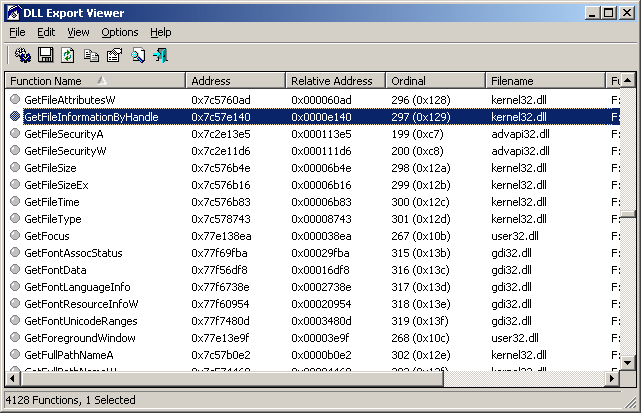
Utilitas ini menampilkan daftar semua fungsi diekspor dan alamat virtual mereka memori untuk file DLL tertentu. Anda dapat dengan mudah menyalin alamat memori dari fungsi yang diinginkan, paste ke debugger Anda, dan menetapkan breakpoint untuk alamat memori. Ketika fungsi ini dipanggil, debugger akan berhenti pada awal fungsi ini.


Misalnya: Jika Anda ingin istirahat setiap kali kotak pesan yang akan ditampilkan, hanya menempatkan Breakpoints pada memori alamat dari pesan-kotak fungsi: MessageBoxA, MessageBoxExA, dan MessageBoxIndirectA (atau MessageBoxW, MessageBoxExW, dan MessageBoxIndirectW dalam unicode berdasarkan
aplikasi) Ketika salah satu dari pesan-kotak fungsi disebut, debugger Anda harus istirahat di titik masuk dari fungsi itu, dan kemudian Anda dapat melihat panggilan stack dan pergi ke belakang ke dalam kode yang diprakarsai ini panggilan API.

Mulai menggunakan Viewer DLL Ekspor
Utilitas ini tidak memerlukan proses instalasi atau tambahan DLL, untuk mulai menggunakannya, cukup menjalankan file eksekusi - dllexp.exe
Ketika DLL Ekspor Viewer load, Anda harus memilih salah satu pilihan berikut:

    Memuat semua fungsi dari DLL sistem standar: Ini adalah pilihan default. Jika Anda memilihnya, fungsi API diekspor standar DLL Windows (kernel32.dll, user32.dll, dan sebagainya ...) akan ditampilkan.
    Load fungsi dari file DLL tertentu: Jika Anda memilih pilihan ini, Anda harus menentukan file DLL yang Anda ingin memuat dalam kotak teks di bawah pilihan ini. Anda juga dapat menentukan wildcard untuk loading file DLL ganda. Jika karena alasan tertentu, Anda ingin melihat semua fungsi API pada sistem Anda, Anda dapat menentukan sesuatu seperti 'c:. \ Windows \ system32 \ * dll' - tapi saya harus memperingatkan Anda ... Anda akan mendapatkan daftar fungsi yang sangat lama, mungkin lebih dari 50.000 fungsi!
    Load fungsi dari file DLL ditentukan pada file teks berikut: Jika Anda memilih pilihan ini, file teks tertentu harus berisi daftar file DLL, dipisahkan oleh Masukkan karakter (CR-LF). Semua fungsi yang diekspor dari DLL tertentu akan dimuat.
    Load fungsi dari semua DLL yang melekat pada proses yang dipilih: Ini adalah pilihan yang paling berguna jika Anda ingin menggunakan utilitas ini untuk debugging.
Pilih proses yang sedang Anda debugging, dan fungsi yang diekspor dari semua DLL yang melekat pada proses yang dipilih akan ditampilkan.

Persyaratan Sistem
Utilitas ini bekerja dengan baik pada semua versi 32-bit/64-bit Windows, termasuk Windows 98/ME, Windows NT, Windows 2000, Windows XP, Windows Server 2003, dan Windows Vista. Jika Anda ingin menggunakannya pada Windows NT, Anda harus menambahkan psapi.dll ke folder system32 Anda.


Comments Process Hacker V2.27

Process Hacker is a feature-packed tool for manipulating processes and services on your computer. Includes a simple, customized tree view, detailed performance graphs, list of network connections, comprehensive process list (including hidden), full control over processes, rootkit termination, and DLL controls.
Writes settings to: Settings location is specified by passing the -settings parameter to Process Hacker, together with the full path to the settings file.
How to extract:
  • Download the ZIP package and extract to a folder of your choice.
  • Create a blank file named ProcessHacker.exe.settings.xml in the same folder asProcessHacker.exe (in subfolder x86 for 32-bit Windows; in subfolder x64 for 64-bit Windows).
  • Launch ProcessHacker.exe.
Alternatively you can use a Bat Launcer kindly contributed by a. It automatically chooses between 32 and 64-bit versions of Process Hacker and disables the KProcessHacker driver by default.
Stealth : No. The kprocesshacker.sys driver leaves traces in the Registry.To make the program stealth, delete/rename kprocesshacker.sys before launch or start the program with -nokph switch. Note that this will disable some advanced features.
License: GPL v3
System Requirements: WinXP / Vista / Win7


Sabtu, 18 Februari 2012

Comments Adobe Photoshop CS6 13.0 FULL VERSION


about :
Adobe Photoshop CS6 - a program for processing raster graphics. Supports numerous graphic formats. Adobe Photoshop allows you to create new images and edit them. Photoshop used to create photorealistic images to work with color scanned images, retouching, color correction, transformation of graphs, color separation, etc. Adobe Photoshop has all the methods of working with bitmaps, in this case is to work with layers and uses contours. The program is the undisputed leader among professional graphic editors due to its widest possibilities, high efficiency and speed. Adobe Photoshop provides all the necessary tools for correcting, editing, preparing images for printing and high quality output.

The newest version of Adobe ® Photoshop ® CS6 software redefines digital imaging with breakthrough tools for photography editing, superior image selections, realistic painting, and more. And now, use it with creativity-boosting mobile apps. Adobe Photoshop CS6 software delivers breakthrough capabilities for superior image selections, image retouching, realistic painting, and 3D extrusions. Experience 64-bit support for fast performance as well as dozens of time-savers throughout your workflow.


Automatic lens correction
Save time with automatic correction of lens distortions, chromatic aberration, and vignetting. Photoshop CS5 uses an image file \ 's EXIF ​​data to make precise adjustments based on the type of camera and lens you used.

Lens Correction filter improvements
Work more intuitively with the Lens Correction filter. Grid display is off by default; chromatic aberration correction sliders allow decimal point adjustments; a third slider can correct common green / magenta aberrations; and more.

Straighten Image tool
Quickly straighten any crooked image. Simply drag a straight line from the Ruler tool onto your image, and the image will snap to the line.

Gradient tool preset for neutral density
Use the Neutral Density preset to emulate a neutral density filter, clicking once to have the Gradient tool darken an overexposed patch of a photo while leaving the rest unaltered.

Complex selections made easy
Select specific areas within an image in fewer clicks. Easily select intricate image elements, such as hair; eliminate background color around selection edges; and automatically vary selection edges and perfect masks using new refinement tools.

Content-Aware Fill
Remove any image detail or object and watch as Content-Aware Fill magically fills in the space left behind. This breakthrough technology matches lighting, tone, and noise so it looks as if the removed content never existed.

Superior HDR imaging
Create photo-realistic or surreal HDR images with unprecedented speed and control. Get better-than-ever results thanks to automatic ghost removal and greater control with tone mapping and adjustments, and even give single-exposure photos the look of HDR.

Extraordinary painting effects
Easily change a photograph into a painting or create unique artistic effects with the Mixer Brush, which offers on-canvas color blending, and Bristle Tips, which let you create lifelike, textured brush strokes.

Content-Aware Fill
Remove any image detail or object and watch as Content-Aware Fill magically fills in the space left behind. This breakthrough technology matches lighting, tone, and noise so it looks as if the removed content never existed.

Extraordinary creative tools
Achieve realistic painting effects with the ability to mix colors on canvas and create natural brushstrokes. Merge multiple exposures into stunning high dynamic range (HDR) images. Move, remove, warp, or stretch any image element.

State-of-the-art photography

Easily merge multiple exposures to extend the dynamic range with more power, precision, and fidelity than ever before. Convert to black-and-white in new ways. And use Dodge, Burn, and Sponge tools that intelligently preserve color and tone details.

Easy access to core editing power

Get just the tools you need - exactly when you need them - as you perform common editing activities. Adjustments and Masks panels guide you in making precise adjustments and masks.

A revolutionary tool for Content-Aware Fill with developed intellect can instantly remove any object or part of the image carrying fill the space with the light of the other parts of the image. He just picks up light, tone and noise, depending on the surrounding area, which allows to eliminate any traces of the deleted object. With the new Refine Edge tool, users can perform the selection, which was virtually unavailable earlier. Innovative technology accurately detects and creates a mask for the most complex types of objects, such as hair or foliage of trees, while not capturing the background.

With the advent of Photoshop CS6 photographers have access to a function of the new generation to create images with high dynamic range (HDR). Combining pictures with different exposures into one HDR image, Photoshop CS6 accurately retains the full range of key scenes. New technology HDR Pro to eliminate spurious distortions and provides more precise control of the tone mapping. With features HDR rendering, users can simulate spectacular HDR images using a single image.

Photoshop CS6 includes revolutionary tools to enhance the creative potential of users. Brand new drawing tools include a tool Mixer Brush, who mixes an infinite number of colors on one brush tool Bristle Tips, creating the effect of smear brush. With Puppet Warp tool, users can change the position or view of any element in an image, for example, straightened his bent arm on the photos or adjust an image of the landscape to create a new spatial perspective.

Among the most interesting innovations are the following:
"Technology Truer Edge, improves the definition of the boundaries of objects in the photographs.
"Tools of the Content-Aware Fill to remove from the image of an object and automatically fill the space with the relevant content.
"Advanced tools for working with HDR-images, which include tool HDR Pro, which improved removal of artifacts and image adjustments. Using the HDR-toning, you can simulate the look of the HDR-image to the usual picture.
"Tools Mixer Brush, blending the colors in one brush
"Puppet Warp Tool for the strain of any element of the image. It can, for example, change the landscape to create a different perspective, or to straighten a bent arm.
"The ability to save 16-bit images in JPEG.
"Custom mini-bar Adobe Mini Bridge for fast file management, which is available directly from the application.

New features:
»« Smart Object »become even smarter. Thanks to "infinitely" scalable vectors based on the data of image pixels, the new Photoshop is able to perform operations such as deformation, interpolation, canvas rotation, 3D-manipulation, etc.
"There are new drawing tools and graphics. "Dynamic brush" - with more settings, dryness, toughness, transparency, full emulation of this brush.
"The integration of static images from video taken by DSLR-camera.
"The ability to voice control operations in conjunction with the keyboard and mouse.
"Dynamic layers. "Smart" layers which can be manipulated in real time and that can dynamically interact with other layers.
"Advanced distortion correction. The ideal solution for the correction of panoramic and architectural shots.
"Easier to switch between screens, and optimization of image resolution for different monitors.
"Thanks to the increase in performance workflow operations will now take less time.

Information about the software
Title: Adobe Photoshop
Year: 2011
Category: Graphics & Design
Developer: Adobe

On the file:
Enabling | reg code: there
Language: ENG/MULTI
File format: rar
Platform / OS: Microsoft Windows 2000/XP/Vista/7
File size: 2.05 GB

Download

NB : Jika ada file yg rusak jangan segan untuk berkomentar .

Comments Anti keylogger


Wah gan, yg satu ini ganas banet!! baru aja di instal keyloger langsung MATI...
keyloger nya kedelet otomatis

Top dah pokoknya!! dah gw coba .


Sumber : Gayor Community


download anti keyloger
klik disini

[ Followers ]

 
----------------------------------

-----------------------------------
Chat
Stop Plagiat [ Free Copas Asal Sertakan Sumbernya !! ] Join This Site